Live Tracking
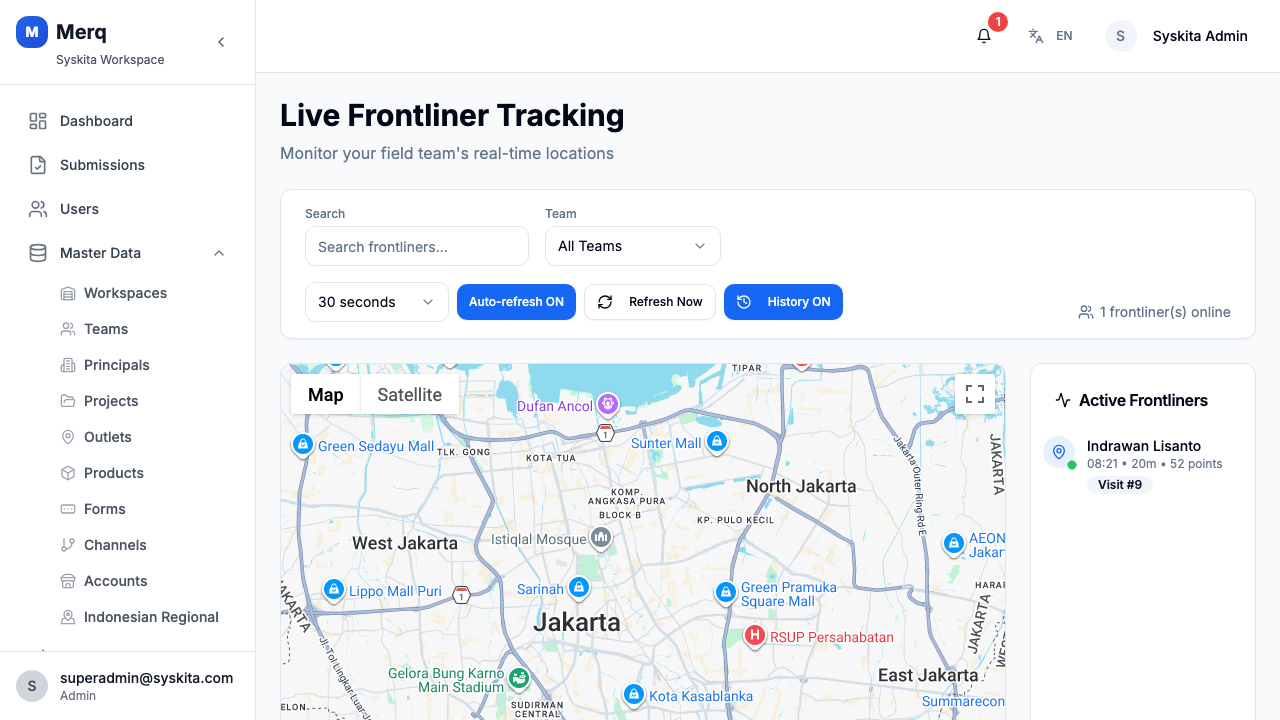
The Live Tracking page displays the real-time GPS positions of all active frontliners on an interactive map.
Accessing Live Tracking
Section titled “Accessing Live Tracking”Navigate to Live Tracking in the sidebar. The page loads a Google Maps view centered on Jakarta (default) with markers for each active frontliner.
Map Interface
Section titled “Map Interface”Frontliner Markers
Section titled “Frontliner Markers”Each active frontliner appears as a map marker showing:
- Their name
- Current GPS position (latitude/longitude)
- Last update time and GPS accuracy
Click a marker to open the Info Window:
| Field | Description |
|---|---|
| Name | Frontliner’s full name |
| Last Update | Timestamp of the last GPS ping |
| Accuracy | GPS accuracy in meters |
| Coordinates | Latitude / Longitude |
| Location History Count | Number of recorded positions in the current session |
| Visit Badge | Active visit indicator (if currently on a visit) |
| Mock Location Badge | Warning indicator if device mock location is detected |
Location History Trail
Section titled “Location History Trail”When History is enabled, each frontliner’s movement path is shown as:
- A polyline connecting recorded positions in order
- Small circle markers at each recorded location point
Toggle history on/off using the History button in the top controls.
Sidebar — Frontliner List
Section titled “Sidebar — Frontliner List”The left sidebar lists all active frontliners with their names and last-seen times. Click any name to center the map on that frontliner.
Use the search by name field at the top of the sidebar to quickly find a specific frontliner.
Controls
Section titled “Controls”| Control | Description |
|---|---|
| Search | Filter frontliners by name in the sidebar |
| Refresh | Manually refresh all frontliner positions |
| Auto-Refresh toggle | Automatically refresh at a selected interval |
| Auto-Refresh interval | Choose: 15s / 30s / 1 minute / 5 minutes |
| History ON/OFF | Show or hide movement trail polylines |
- The map is centered on Jakarta by default. If your operations are in a different area, the map will center on the first active frontliner’s location once data loads.
- Mock location detection flags are informational — a badge is shown on the marker but does not block tracking.
- Frontliners not currently active (no recent GPS ping) will not appear on the map.